Nothing leaves the tab
Ninety-four free PDF tools in eleven languages that run entirely inside the browser tab, with a live meter showing that nothing has been uploaded.
Introduction
PDF.World is a set of free PDF tools that run in the browser. It merges, splits, converts, compresses, signs, redacts and recognises text, and it makes new documents from scratch: invoices, certificates, badges, tickets, letters. On its home page it counts 94 tools in six families and eleven languages. It needs no account and puts no watermark on the result.
What sets it apart is a claim about where the work happens. Most online PDF services send your document to a server, process it there and send it back. PDF.World does the work inside the browser tab, on the visitor’s own device, and makes the claim checkable. Each tool page shows a counter of the bytes uploaded to any server, and the home page invites the reader to open the browser’s Network tab and watch it stay at zero.
This case study covers the design of that product: a catalogue of ninety-four utilities that reads like one object, and an interface that turns a privacy promise into something a visitor can see for themselves.
The challenge
People hand PDF tools some of their most sensitive files: contracts, payslips, medical letters, identity documents, bank statements. The typical online service asks them to upload those files to a stranger’s server for a job that takes seconds. A cookie banner, a sign-up wall and a watermark often come before the result.
Saying “we delete your files after an hour” does not solve that. The design problem was harder. It meant building tools that never need the file to leave the device, then making that architecture readable to someone who has never heard of WebAssembly. A third task followed from the first two. Ninety-four tools, each solving one problem, had to stay findable and consistent without turning into a cluttered menu of icons.
The brief, in one line: make “nothing is uploaded” a property of the product, not a sentence in its policy.
The concept
Three decisions shape the rest of the site.
- The tab is the workshop. Every tool is a client-side application. The About page names the open-source engines that do the heavy work (pdf.js, pdf-lib, qpdf, Ghostscript, MuPDF and Tesseract.js) and says they load on demand, only when the tool that needs them is opened.
- Proof over promise. The privacy statement is built into the interface. A live meter on each tool page, the dark “0 B” band on the home page and an “honest list” on the Privacy page of everything that does leave the browser.
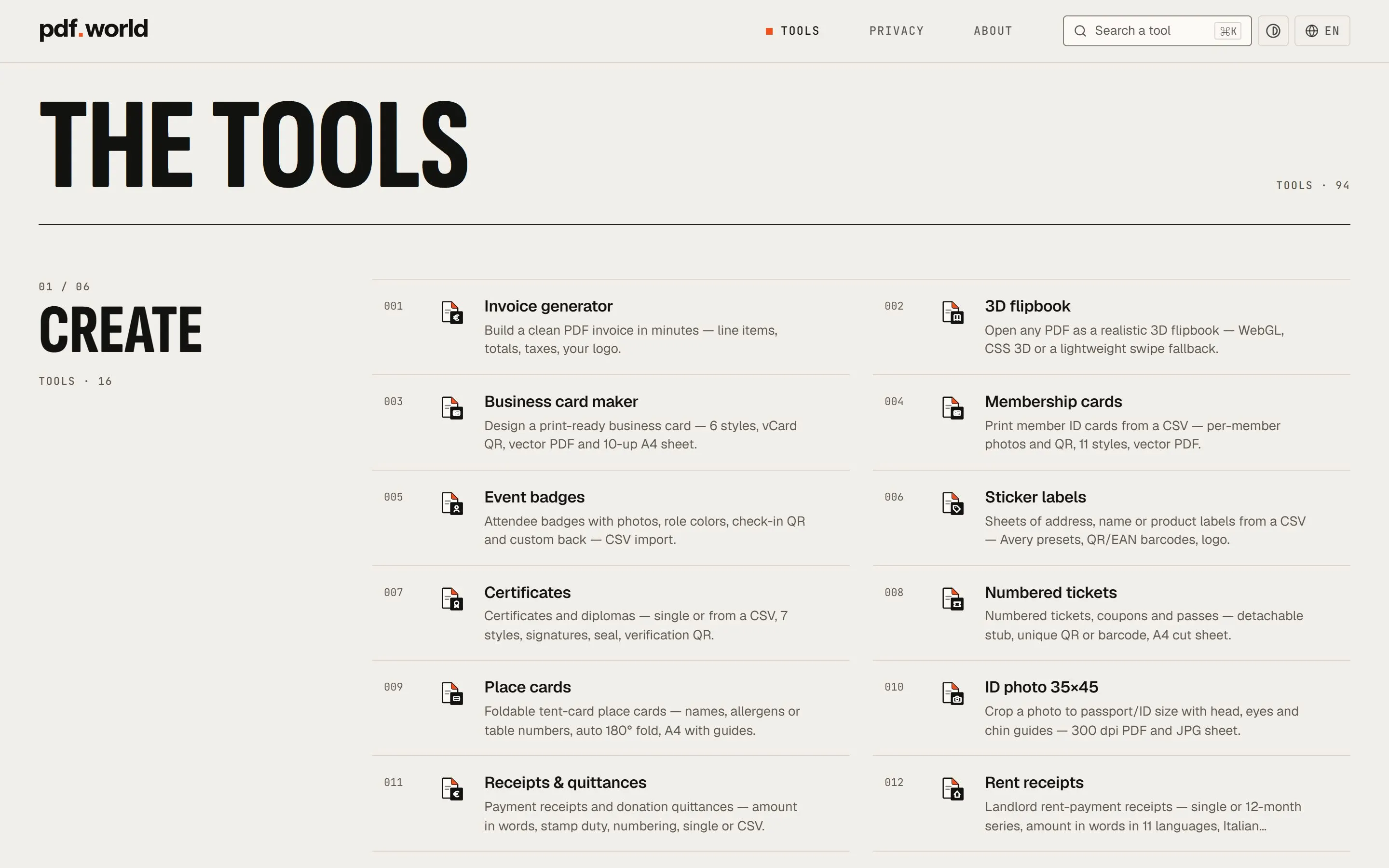
- A catalogue, not a menu. The tools are numbered like entries in a printed catalogue, from № 001 to № 094, and grouped into six numbered families. A tool keeps its number everywhere it appears: on the home page, on its own page, in the footer and in the list of related tools.
Everything happens in this tab. Open your Network tab and watch it stay at zero.
The design
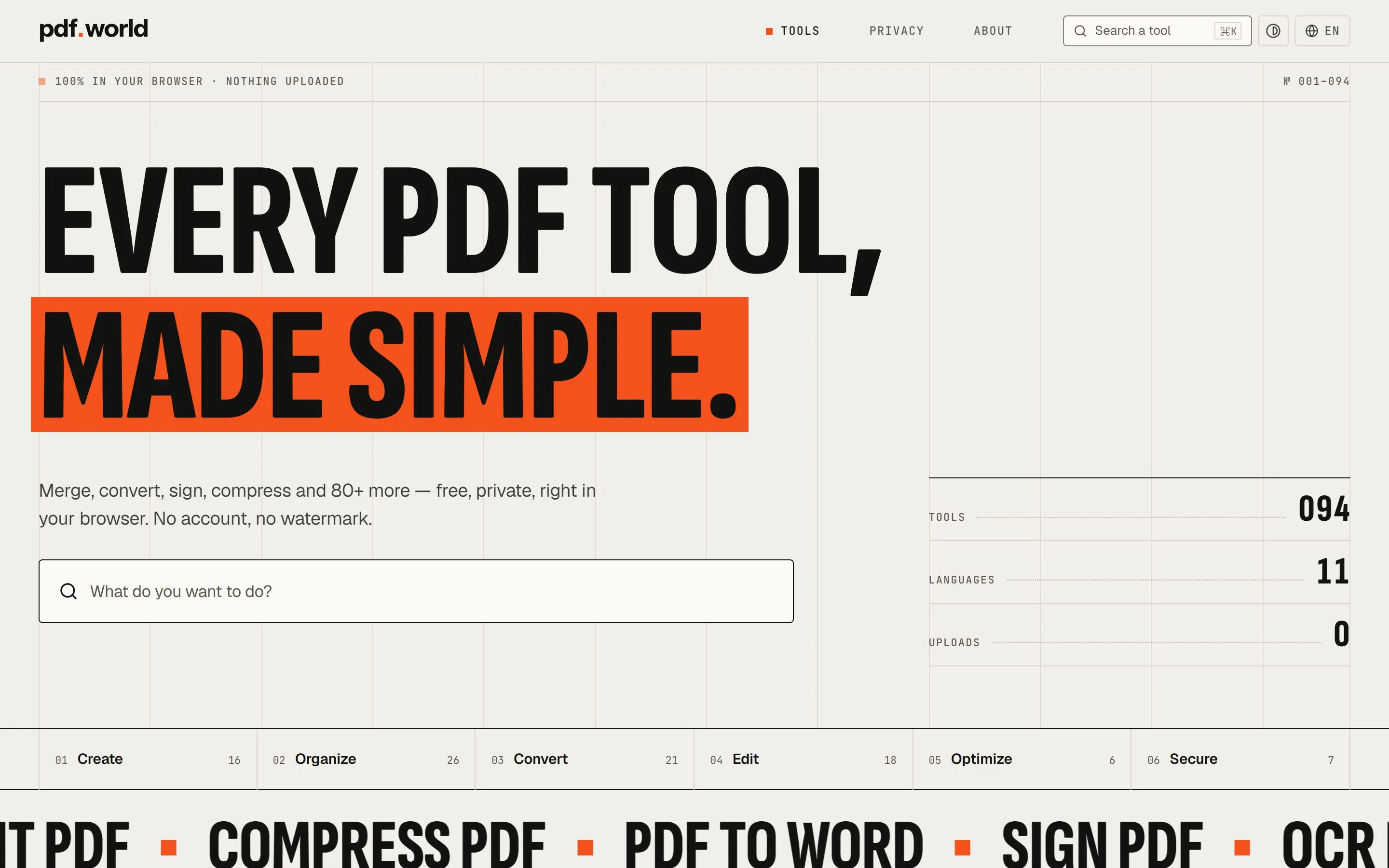
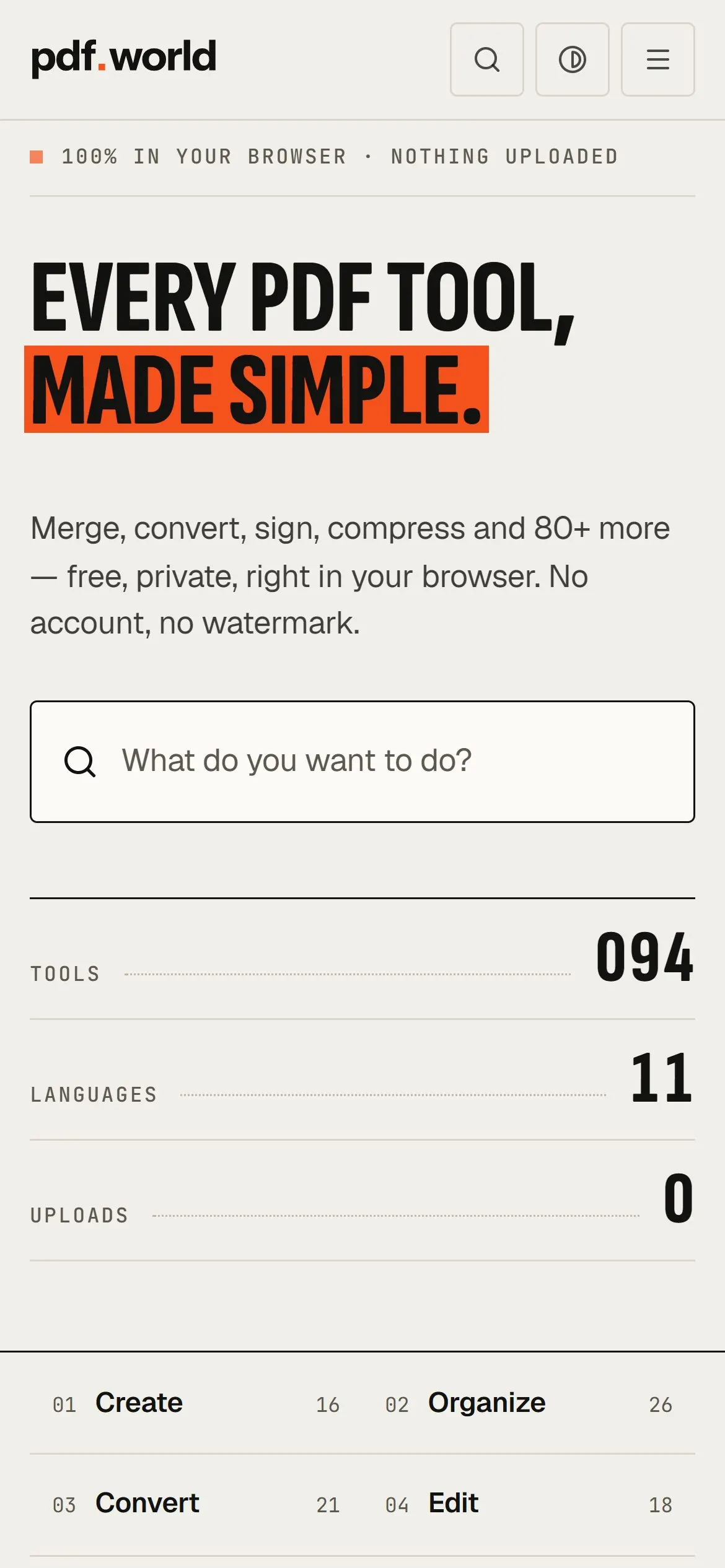
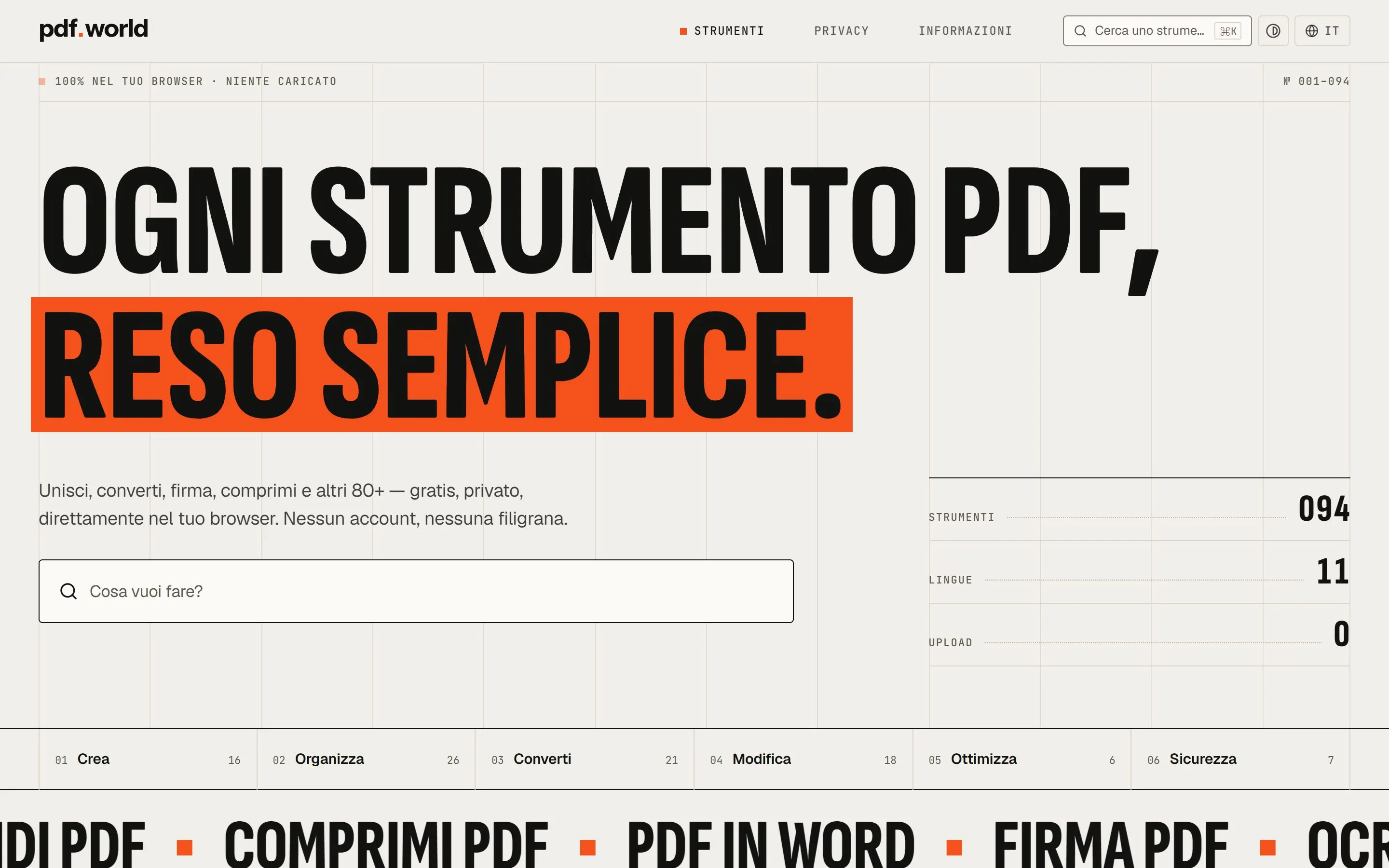
A specimen of type. The home page opens with “Every PDF tool, made simple.” set in Sofia Sans Extra Condensed at weight 800, about 167 pixels tall on a desktop screen. The second line sits on a band of orange. Body text uses Geist; JetBrains Mono carries the record: numbers, labels and file sizes. Behind the headline runs a faint grid of vertical rules, like a layout sheet. Above it, two small lines frame the page: “100% in your browser · nothing uploaded” on the left, “№ 001–094” on the right.
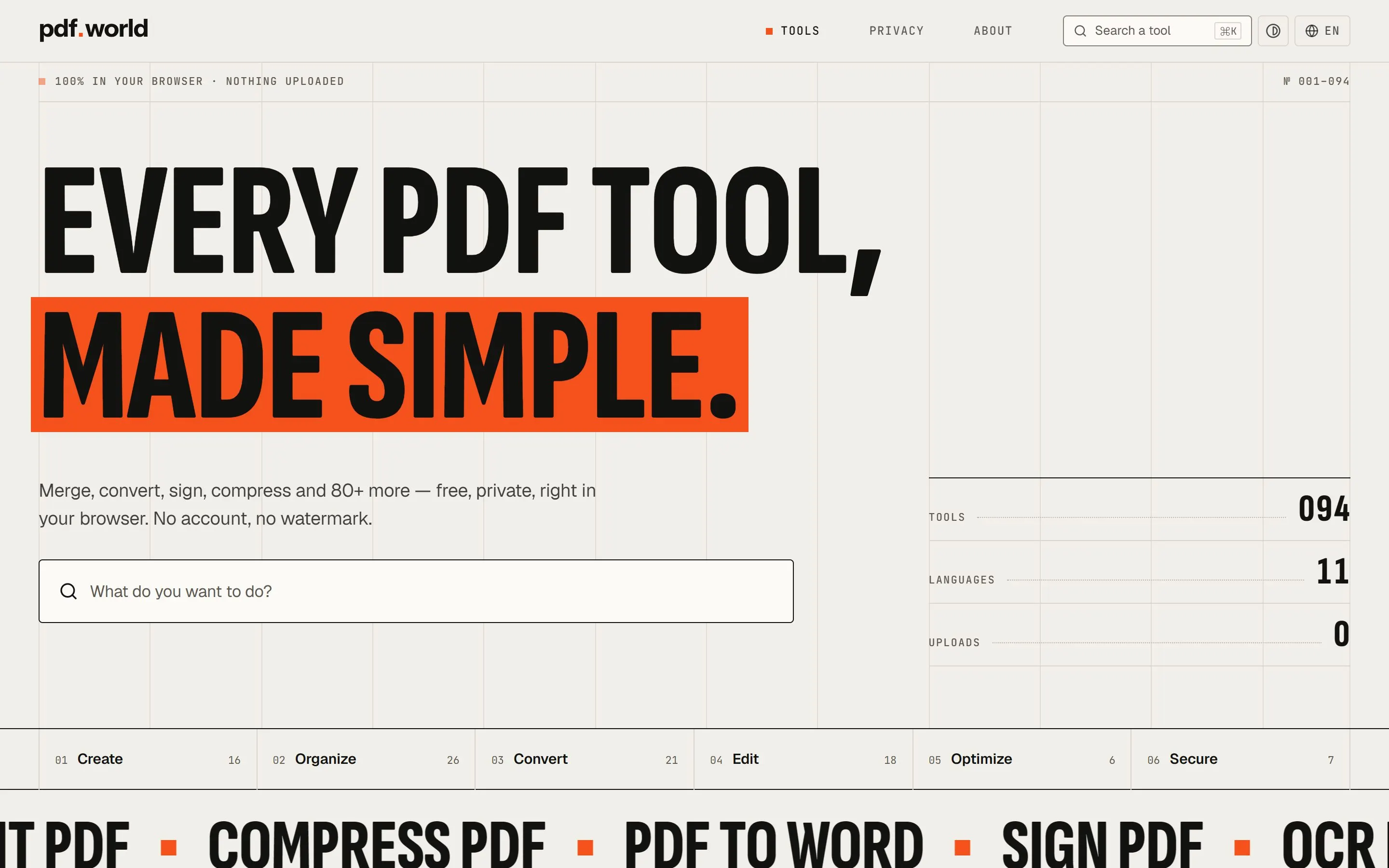
Paper, ink and one colour. The palette is drawn from paper: a warm off-white page (#f1efea), near-black ink (#121211) and one orange (#f5511c), which is also the square in the favicon. The orange marks the active page, the main action and the separators in the ticker. The design tokens also carry a darker orange ink (#b33600) for numerals and text on the light page, where the bright orange would be too faint to read. The main button sets dark text on orange rather than white, for the same reason.
A system of numbers. The home page lists every tool in its family. Each row carries the tool’s three-digit number, an icon, a name and a one-line description. Each family opens with its own fraction and count: “01 / 06 Create, Tools · 16”. The icons follow one rule: a sheet of paper with an orange folded corner, and a small black badge for the job, such as a euro sign for invoices or scissors for splitting. Ninety-four tools share a single drawing.
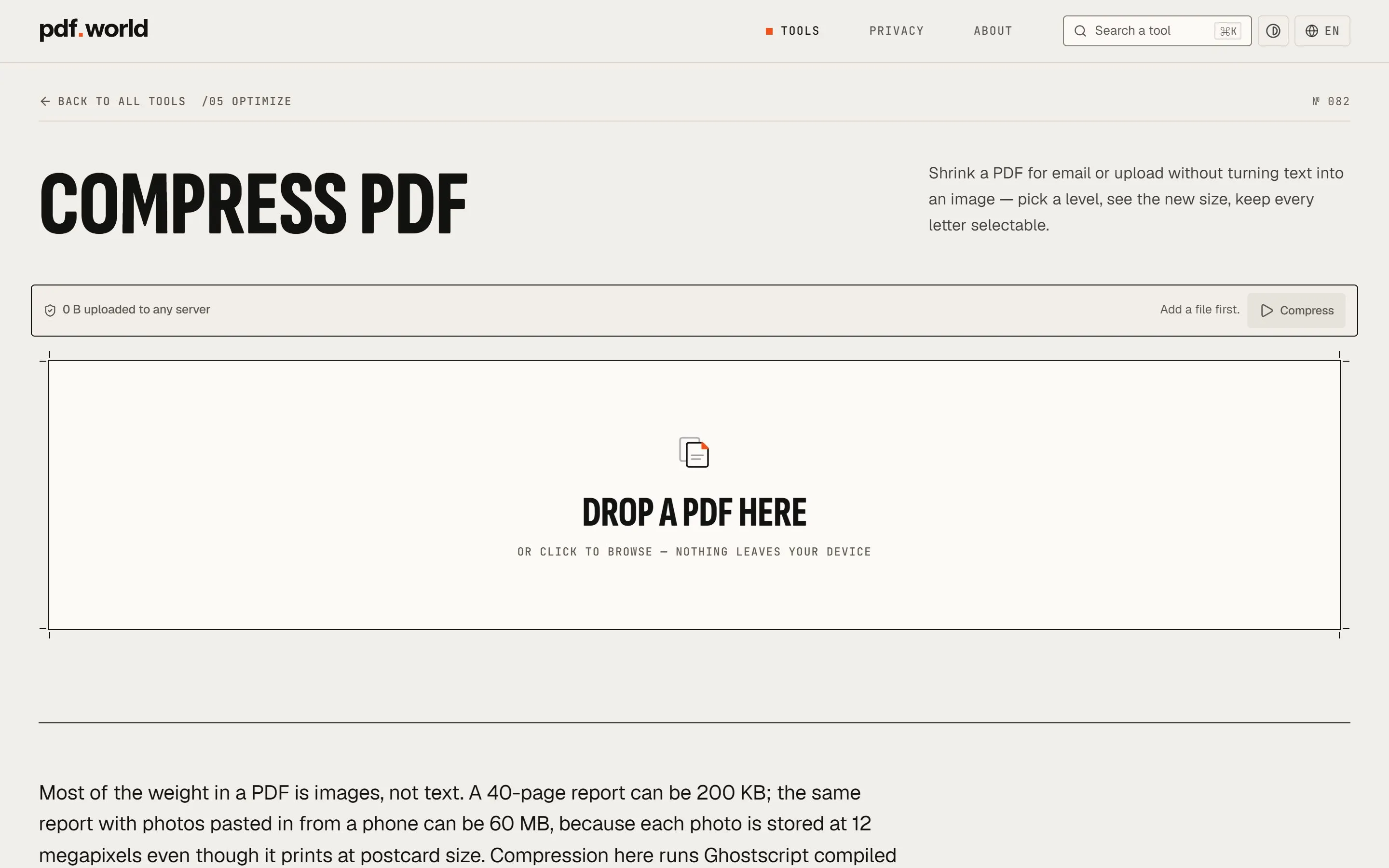
Print marks on the screen. The drop zone on each tool page is framed with crop marks at its corners, like a sheet ready for the guillotine. The tool pages share one plan: a breadcrumb with the family (“/02 Organize”), the tool’s number at the right, a condensed title, and then a single bar holding the upload meter, a reset button and the main action. The action stays grey and says what is missing (“Add 2 files first.”) until the tool can run.
The experience
To see how a tool behaves, FIG made six small test PDFs on its own machine and ran them through six tools on the live site on 18 November 2026: Merge, Split, PDF to Word, Compress, Sign and the Invoice generator.
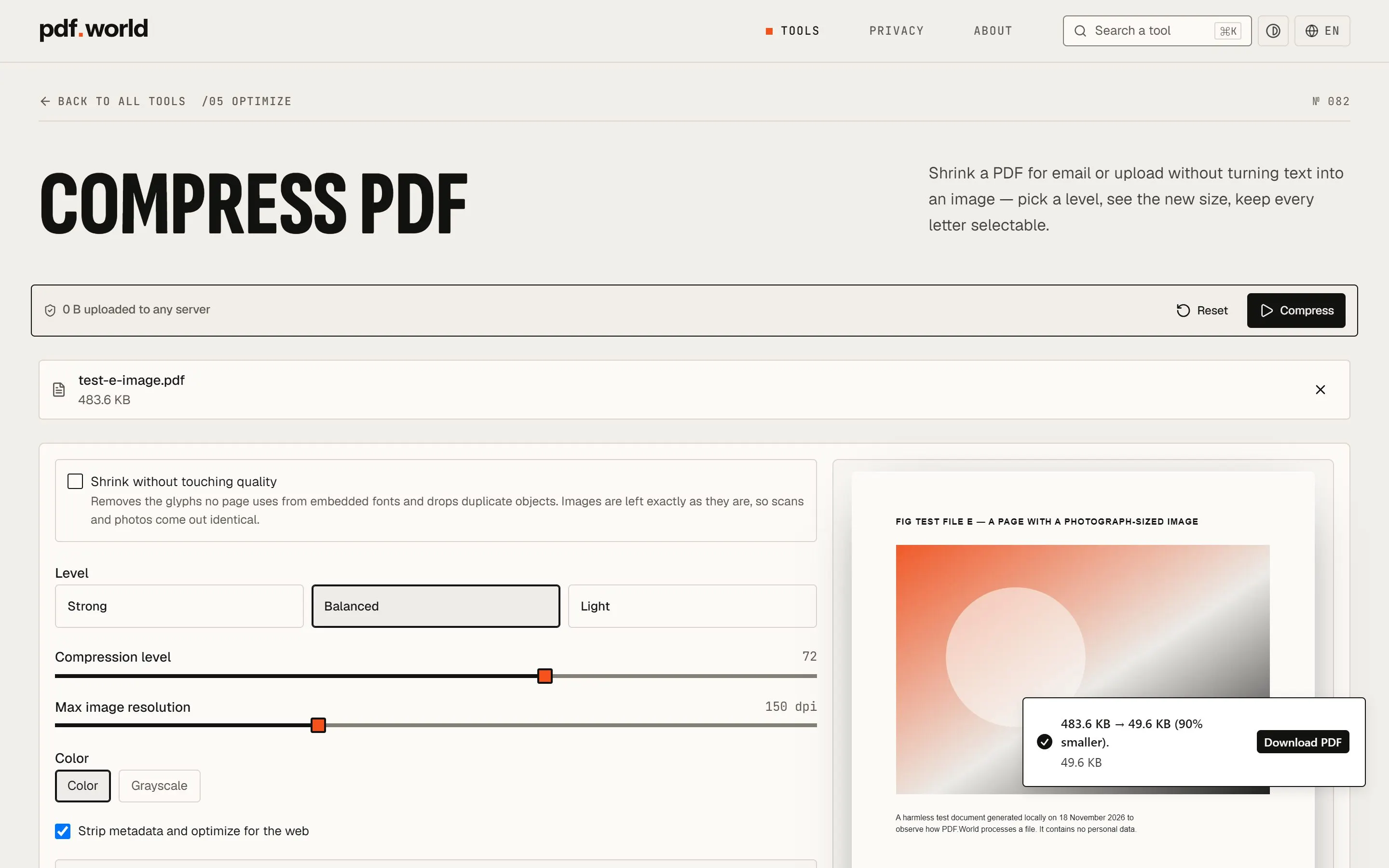
Compress PDF (№ 082) shows the pattern best. Before a file arrives, the page is one large drop zone, and the line under it reads “or click to browse — nothing leaves your device”. Once a 483.6 KB test file with one large image was added, the tool showed its options. There were three levels (Strong, Balanced, Light), sliders for compression and maximum image resolution, a colour or grayscale choice, and a preview of the first page. Then it ran a real compression to show an estimate before any download: 483.6 KB to 49.6 KB, 90% smaller. The file it returned had been written by Ghostscript, and its text could still be selected and copied, as the page says it would.
The other tools follow the same plan, each with its own working surface:
- Merge PDF (№ 018) lists the files in the order they will be joined, with arrows to move each one up or down. Two test files (two pages and one page) came back as one three-page PDF in the order shown.
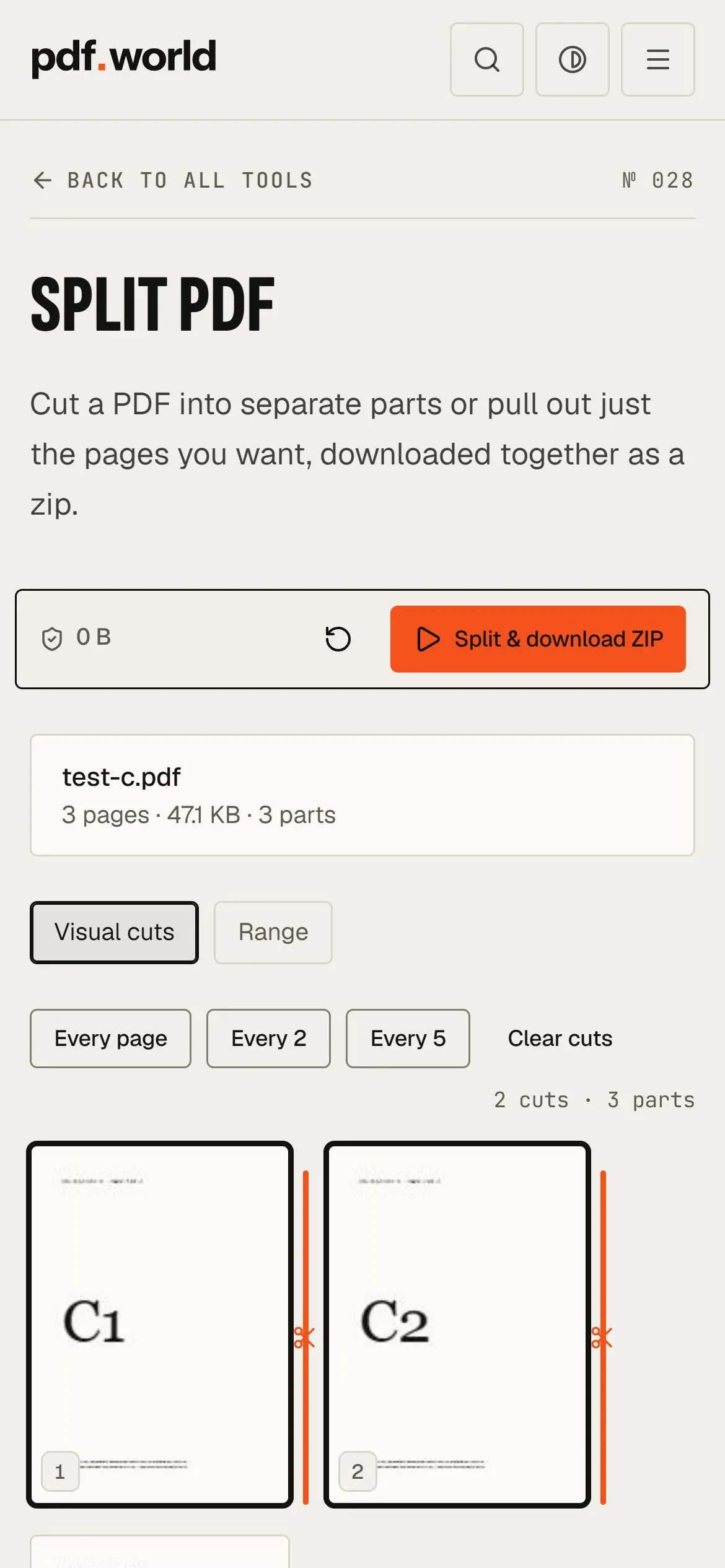
- Split PDF (№ 028) draws the pages as thumbnails with orange cut lines between them. “Every page” returned a zip of three one-page PDFs.
- PDF to Word (№ 043) warns before anything else that it gives a best-effort text extraction, not a faithful layout conversion. It then previews the text it recognised and returns a .docx.
- Sign PDF (№ 065) lets you draw or type a signature and place it on the page. It also says plainly that this stamps an image of a signature and is not a cryptographic one. For that it points to a separate Digital signature tool (№ 088).
Below the working area, every tool page carries the same editorial sections. A short essay explains the job, such as why alphabetical order is the most common way a merge goes wrong. Then come four numbered steps, a few real uses, a set of frequently asked questions and the related tools. The steps and questions are also published as structured data, so the page explains itself to search engines too.
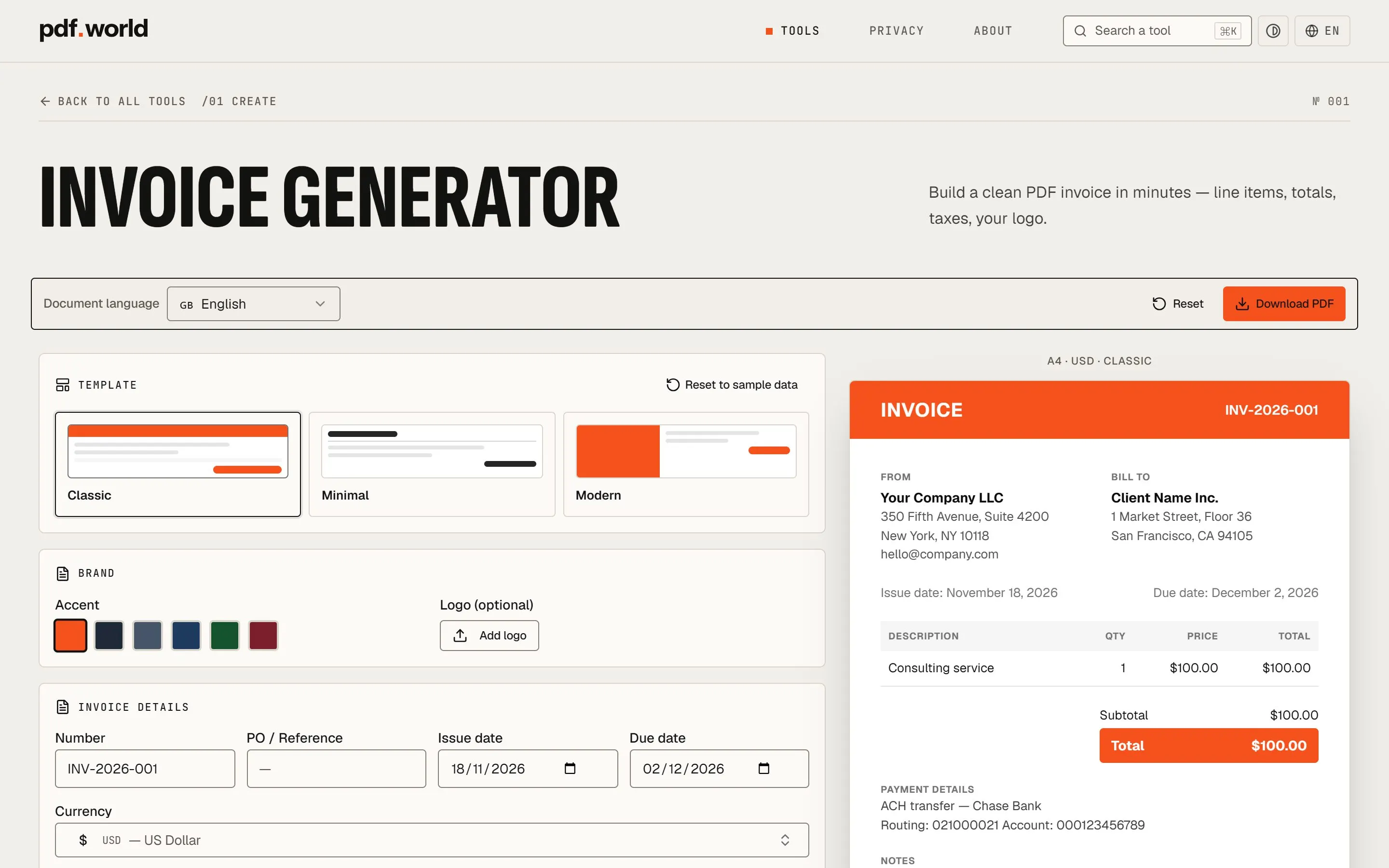
The Create family turns the same principles into document makers. The Invoice generator (№ 001) is a form on the left and a live A4 preview on the right. It has three templates (Classic, Minimal, Modern), six accent colours, a document language and a currency, and it does the arithmetic of line totals, discounts and tax. On the day of the test, its sample invoice came back as a one-page PDF of 2,128 bytes.
What leaves the browser
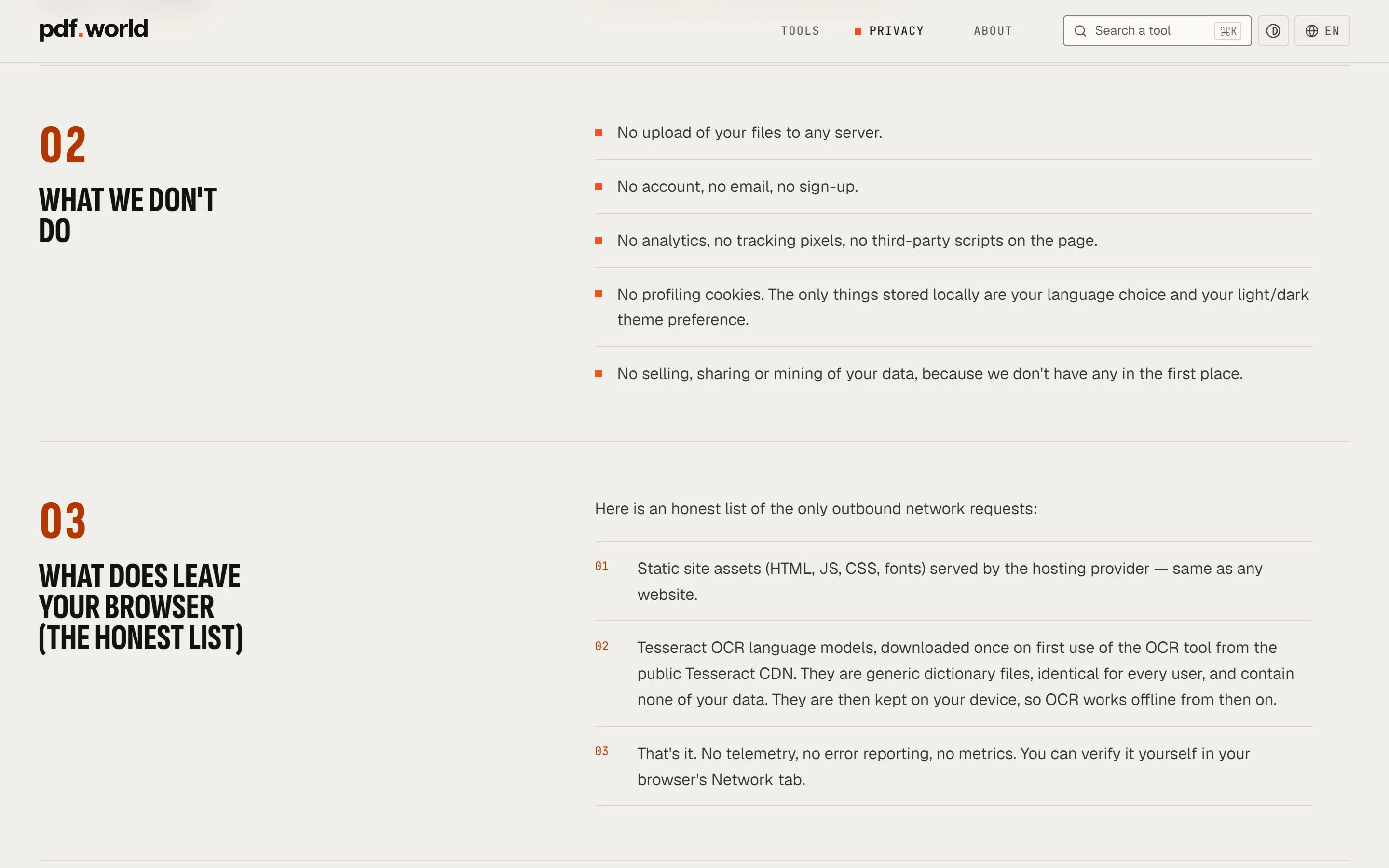
The Privacy page, last updated in June 2026, is written as a short technical document rather than a legal one. Its title gives the answer: “What happens to your files: nothing”. It lists what the site does not do: no upload, no account, no analytics, no tracking pixels, no third-party scripts, no profiling cookies. Then it gives “the honest list” of the only requests that do leave the browser: the site’s own files, and the Tesseract language models that the OCR tool downloads once, on first use, from the public Tesseract CDN.
The page ends by stating its own limits, which is unusual for a privacy statement.
It describes the current implementation; it is not a legal certification.
FIG tested the claim rather than repeating it. During the six tool runs, a script recorded every network request made by the pages and by their background workers. The results:
Opening a tool
- 01The page loadspdf.worldHTML, scripts, styles and three typefaces, all from pdf.world. No request went to any other domain.
Adding a file
- 02The file is readBrowserThe test PDF was opened in the tab. No request carried it anywhere: every request in the session was a download (GET), with an empty body.
- 03The engine arrivespdf.worldOnly then did the tool fetch what it needed, from pdf.world itself: the pdf.js worker, MuPDF for text, Ghostscript and qpdf for compression.
Processing
- 04The work is doneBrowserMerging, splitting, conversion, compression and signing ran in the tab and its workers. Wherever the meter was on screen, it read 0 B throughout.
- 05The result is savedBrowserEach tool returned its file as a direct download: a merged PDF, a zip of pages, a .docx, a smaller PDF, a signed PDF, an invoice.
With the network cut
- 06The same, offlineBrowserWith the connection switched off, each tool was run again and each one still produced its file.
The meter is simple by design. The page wraps the browser’s two everyday ways of sending data, fetch and XMLHttpRequest, and adds up the size of every request body that passes through them. While the total is zero, the meter shows a green shield and “0 B uploaded to any server”. If the total grew, it would turn amber. It does not stand in for the Network tab, but it keeps the claim in view at the point where a visitor is deciding whether to trust the tool.
The system
Built to work offline. The footer carries a button labelled “Make available offline”. It is backed by a service worker that is published openly at /sw.js and described in its own header as “hand-rolled, zero dependencies”. In FIG’s test the button showed a percentage while it ran. It fetched 209 files from pdf.world in under half a minute, among them the engines for compression, OCR and conversion. It then changed to “Works offline”. With the network cut afterwards, tool pages that had never been opened in that session still opened, in English and in Italian, and Merge PDF still joined two files. The web app manifest also offers Merge and Compress as shortcuts once the site is installed.
Eleven languages, one catalogue. The interface exists in English, Italian, Spanish, French, German, Dutch, Polish, Portuguese, Indonesian, Malay and Russian. English sits at unprefixed addresses, and every other language has its own prefix, so the merge tool in Italian is /it/tools/merge. The tool numbers do not change between languages, but the copy does: the Italian home page reads “Ogni strumento PDF, reso semplice.”, and its families are Crea, Organizza, Converti, Modifica, Ottimizza and Sicurezza. A few tools are written for one country, and say so: the self-declaration (№ 013) carries an “IT” tag and the note “Italy only”.
Written for machines as well. Each page declares all eleven language versions, plus a default, with hreflang. The sitemap repeats those links for every address. On 18 November 2026 it listed 1,067 URLs: eleven languages, each with a home page, an About page, a Privacy page and 94 tool pages. The site also publishes an llms.txt file describing the suite and linking every tool, and a robots.txt that allows every crawler. The structured data describes PDF.World as a free web application and names its author and publisher.
Details
- Honest limits in the interface. PDF to Word opens with a warning about layouts. Sign PDF says it is not a cryptographic signature. Compress explains that a text-only file will barely shrink, “and the honest outcome is a file close to the original size”.
- Open source, credited. The About page lists the six engines with their licences and links to their source code. It also notes that Ghostscript and MuPDF are licensed under the AGPL-3.0 and are delivered to the browser unmodified.
- A written commitment. The About page says the core tools are free and will stay free, that files are never uploaded, that no account is needed, and that if any of this changes, that page will be updated first.
- Search from anywhere. The header of every page carries a search field marked ⌘K, and the home page’s own search asks “What do you want to do?”.
Outcomes
- 94tools, numbered № 001 to № 094
- 6families: 16, 26, 21, 18, 6 and 7 tools
- 11interface languages
- 1,067URLs in the sitemap, 18 November 2026
- 0 Bsent in request bodies while six tools ran FIG’s test files
- 6open-source engines, credited with their licences
Read and tested on the live site on 18 November 2026: the home page, the About and Privacy pages, the sitemap, and six tools run with test files made by FIG.
This case study makes no claims about visitors, usage or rankings. PDF.World does not publish those figures, and it collects no analytics that could produce them.
What it shows is a way to design for trust when the subject is someone’s private documents. Do the work where the document already is. Say exactly what still crosses the network. Then give the visitor a counter, a list and a Network tab, so they can check the claim themselves rather than take it on trust.
Explore the project
pdf.world
Ninety-four free PDF tools in eleven languages that run entirely inside the browser tab, with a live meter showing that nothing has been uploaded.
Sources for this case study
- PDF.World — Home (the catalogue of 94 tools)
- PDF.World — Privacy (what happens to your files)
- PDF.World — About (how it works, the open-source engines)
- PDF.World — Compress PDF (№ 082)
- PDF.World — Merge PDF (№ 018)
- PDF.World — Split PDF (№ 028)
- PDF.World — Invoice generator (№ 001)
- PDF.World — Home in Italian
- PDF.World — Sitemap
Everything described here can be checked on the live project. Figures were read on 21 Nov 2026; screenshots are captures of the public site.